How to Talk to Your Boss About Workload Limits
Use a 4-step, data-driven method to track tasks, set priorities, propose solutions, and keep your workload from causing burnout.

Feeling overwhelmed at work? You're not alone. Many professionals struggle with excessive workloads, leading to burnout, missed deadlines, and declining work quality. But here's the good news: you can address this with your boss effectively.
- Start by tracking your tasks and time: Document your daily activities to identify where your time goes and highlight any overload.
- Analyze your capacity: Understand how much work you can realistically handle without sacrificing quality. Aim for 70–80% of your time on core tasks, leaving a buffer for unexpected issues.
- Prepare for the conversation: Use your data to propose specific solutions, like reprioritizing tasks or delegating responsibilities to a micromanager.
- Communicate clearly: Frame the discussion around business outcomes, not personal struggles, and collaborate on solutions.
- Follow up: Document agreements, schedule regular check-ins, and monitor workload to prevent issues from resurfacing.
The takeaway? Addressing workload limits early shows initiative and helps maintain high performance while protecting your well-being.
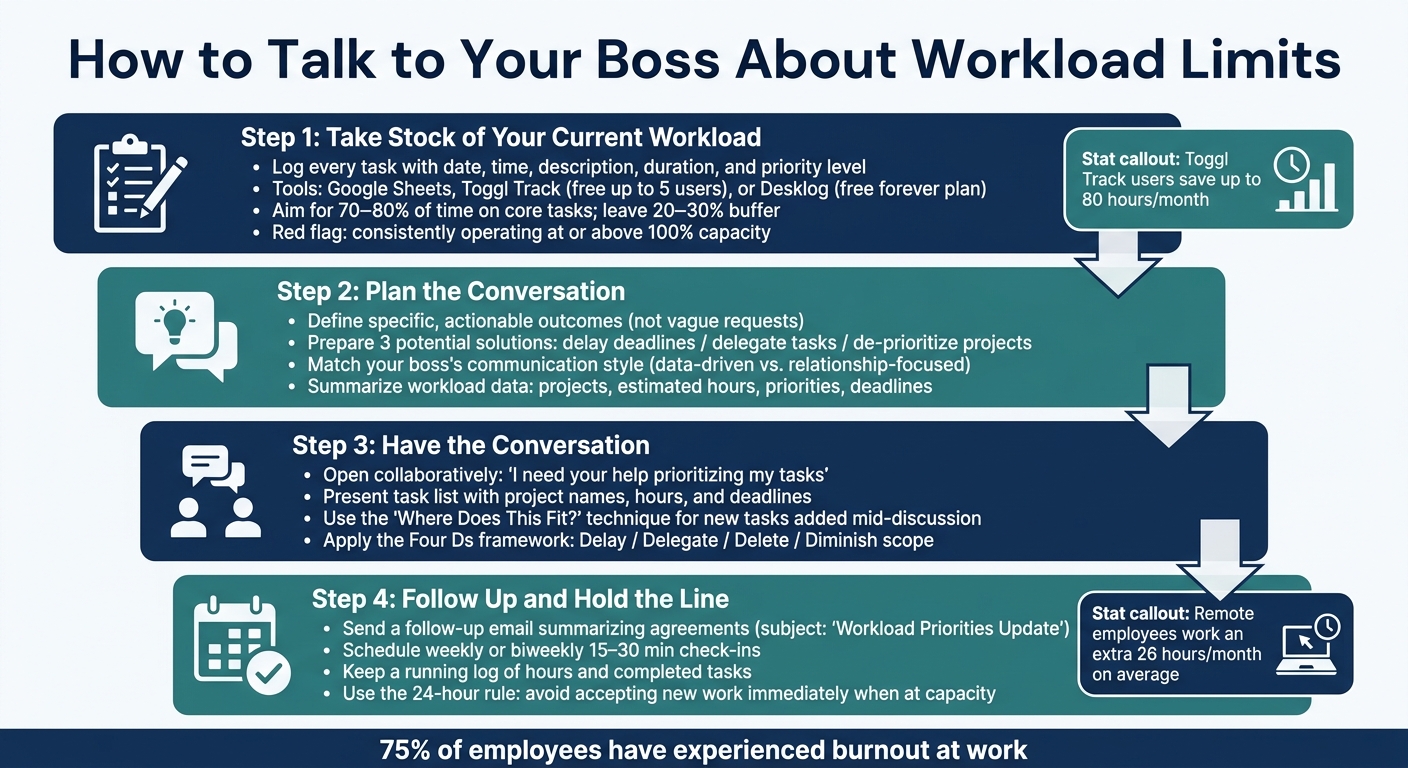
How to Talk to Your Boss About Workload Limits: 4-Step Process - Infographic © MyDifficultBoss.com
Feeling Overwhelmed at Work? Talk to Your Boss | Dr. Pollack Ep. 3
sbb-itb-1bb7cb4
Step 1: Take Stock of Your Current Workload
The first step to creating a manageable work schedule is understanding your current workload in detail. Before discussing changes with your boss, you need clear, documented evidence of how your time is spent.
Log Your Tasks and Hours
Start by tracking every task as it happens. This approach ensures you capture all the small, easily overlooked activities - like quick fixes, impromptu Slack conversations, or last-minute help for a colleague. For each task, note the date, start and end times, a brief description, duration, and its priority level.
You can use a simple Google Sheet or Excel template for this. If you’re looking for something more advanced, tools like Toggl Track (free for up to 5 users) or Desklog (which offers a free forever plan) can automate the process by running in the background. Users of Toggl Track have even reported saving up to 80 hours per month thanks to better time tracking.
"Time logs are more than just a record of hours worked - they're powerful tools for understanding and optimizing how you manage your time." - Hubstaff
Once you’ve gathered enough data, review it to see if your available hours align with the demands of your workload.
Know Your Capacity and Limits
After logging your tasks for a week or two, analyze your capacity. Start with your standard workweek - typically 40 hours - and subtract time spent on meetings, admin tasks, training, and routine duties. What’s left represents the time you truly have for project work.
A good rule of thumb is to aim for 70–80% of your time to be spent on core tasks, leaving 20–30% as a buffer for unexpected issues or last-minute requests. If your logs show you’re consistently operating at or above 100% capacity, it’s a red flag. Without a buffer, any new task could throw everything off balance.
"Working at 100% capacity sounds efficient, but it leaves no margin for error. Building in breathing room means you're not scrambling when someone gets sick, priorities shift, or unexpected work lands." - Dan Collins, SEO Content Manager, Position Digital
Watch for signs of strain, like multitasking, skipping breaks, or underestimating how long tasks take. For instance, if a task you plan two hours for regularly takes three, it’s a sign that your capacity planning needs adjustment. Over time, these gaps can snowball.
Connect Workload to Work Quality
Tracking hours is just one piece of the puzzle. It’s equally important to assess how an overloaded schedule is affecting the quality of your work. Look for patterns in recent projects - like more errors, missed deadlines, or work that feels rushed - and frame these issues as risks to the business rather than personal grievances.
For example, you could say: "Because I don't have sufficient time for Project X, I'm concerned we won't make the projected deadline". Use your time log to connect specific tasks to potential risks or missed deliverables. This data will help you prepare for a productive conversation with your boss, grounded in facts and solutions rather than complaints.
Step 2: Plan the Conversation
Once you’ve assessed your workload, it’s time to prepare for a productive conversation. The goal here is to focus on solutions, not just vent frustrations.
Define What You Want From the Conversation
Be clear about your requests. Vague statements like "I need less work" won’t cut it. Instead, aim for specific, actionable outcomes. For example, could a report shift from monthly to quarterly? Could routine tasks be assigned to junior team members? Or, do you need guidance on which projects should take priority?
As productivity expert Julie Morgenstern advises:
"Never go to your boss with a problem unless you have a solution."
Come prepared with three potential solutions - such as delaying deadlines, delegating tasks, or de-prioritizing projects. This demonstrates that you’re actively seeking to address the issue, not just passing the buck.
Read Your Boss’s Communication Style
Tailor your approach to match your boss’s preferred communication style. If your boss is data-driven, focus on presenting numbers, timelines, and measurable outcomes. On the other hand, if they value relationships, emphasize how workload adjustments could benefit team dynamics or align with long-term goals.
Not sure about their style? The Boss Decoder Tool at MyDifficultBoss.com can help you identify their type and offer strategies for effective communication. Once you’ve aligned your message with their style, back it up with clear, concise metrics.
Pull Together Your Supporting Data
Refer back to the workload data you gathered in Step 1. Summarize your findings with a clear list of projects, estimated hours, priorities, and looming deadlines. The idea is to make your workload visible without overwhelming your boss with excessive details. A snapshot of the situation can help them make informed decisions quickly.
Career expert Alison Doyle explains it well:
"Your message to your manager is that you don't mind working hard, but you're concerned that it's not a sustainable pace and that the quality of your work will suffer."
Be ready for potential objections. One common concern is that asking for changes might make you seem incapable of handling the job. Counter this by framing the discussion around prioritization, not personal limits. For example, if your boss adds a new task mid-discussion, you can respond with, "Where would you like me to put this in priority order?" This shifts the focus back to managing workload effectively.
It’s also also helpful to use tools at websites like MyDifficultBoss.com which provides lots of scripts (and strategies) for dealing with bosses who overload their employees with too much.
Step 3: Have the Conversation
Now that you've gathered your data and prepared your plan, it's time to initiate the conversation. The way you approach, present, and conclude this discussion can make all the difference between finding actionable solutions and walking away with vague promises.
Open on a Positive Note
Start with a collaborative tone by saying something like, "I need your help prioritizing my tasks." This sets the stage for teamwork and positions the discussion as problem-solving rather than complaining. Simon Sinek highlights the value of this approach:
"By having the boss take accountability for priorities, you take accountability for working through them in order."
Instead of simply stating that you're overwhelmed, focus on alignment. For example, say, "I want to make sure I'm spending my time on the highest-priority tasks." This shows you're thinking strategically about your workload.
Share Your Data Without Blame
After setting the tone, present your task list clearly and factually. Include project names, estimated hours, and deadlines. Be specific about potential risks, such as: "At this pace, errors on Q3 deliverables are a risk." Framing the conversation around business outcomes instead of personal struggles keeps it professional and constructive.
Productivity expert Julie Morgenstern emphasizes the importance of being upfront:
"Bosses want their employees to speak up if there is anything that's keeping them from performing at peak levels."
If your manager introduces a new task during the discussion, don't agree to it immediately. Instead, apply the "Where Does This Fit?" technique by showing your prioritized list and asking, "Here is everything listed in priority order. Where would you like me to put this?" This approach keeps the focus on prioritization and trade-offs rather than your capacity limits.
Work Together on Solutions
Come prepared with potential solutions instead of just outlining the challenges. Use the "Four Ds" framework to identify tasks that can be Delayed, Delegated, Deleted, or Diminished in scope.
For instance, Lisa Sterling successfully managed her workload by presenting her projects and proposing the hire of a Director of Product Strategy while pausing certain initiatives. This proactive approach helped her gain support for delegation and leadership adjustments.
If fully offloading a project isn't an option, consider compromises, such as attending a kickoff meeting or reviewing a draft prepared by someone else. Liane Davey, cofounder of 3COze Inc., advises against overextending yourself:
"Trying to be the hero to the point where you burn yourself out is not the best answer."
The ultimate goal isn't to cut corners - it's to focus on doing the most important tasks effectively and with high quality.
Step 4: Follow Up and Hold the Line
Having a productive conversation with your boss is only the beginning. The real challenge lies in ensuring the agreements you reached don’t fade away over time. This step is all about making sure the changes stick.
Put Agreements in Writing
To solidify what was discussed, follow up with documentation. Right after your conversation, send an email summarizing the key points and any decisions made. As Inclusive Leadership Coach Kathy Lu suggests:
"Put your understanding of the assignment in writing, in an email to your boss."
Keep your email concise. Start with a brief overview of the three main points and any required actions, then include supporting details below. Use a consistent subject line like "Workload Priorities Update" so you can quickly locate these emails later - whether for performance reviews or to revisit boundaries. This habit not only ensures clarity but also builds trust and accountability in your working relationship.
Schedule Regular Check-Ins
One conversation isn’t enough to maintain new workload boundaries. Schedule regular one-on-one meetings - weekly or biweekly - to specifically discuss workload and priorities. These short sessions, lasting 15 to 30 minutes, give you a consistent space to address new challenges and prevent workload creep before it spirals out of control.
Ben Horowitz, co-founder of Andreessen Horowitz, highlights the importance of these meetings:
"The key to a good one-on-one meeting is the understanding that it is the employee's meeting rather than the manager's meeting."
Come prepared by reviewing your current projects and progress. If your boss cancels a session, make it a priority to reschedule as soon as possible to keep the momentum going.
Track Progress and Revisit as Needed
Even with clear agreements, workload creep can sneak back in. For example, full-time remote employees often report working an extra 26 hours per month - a clear indicator of how easily boundaries can slip without active monitoring. Keep a running log of your hours and completed tasks. This data can be invaluable if you need to revisit the conversation.
If your boss starts assigning tasks that conflict with your agreed-upon priorities, don’t hesitate to speak up. Use the 24-hour rule: avoid accepting new work immediately if you’re already at capacity. Instead, say something like, "Let me review my current projects and get back to you tomorrow." If additional tasks keep piling up, ask your manager to rank all current projects by priority. This way, the focus shifts to project trade-offs rather than personal limits, keeping the conversation professional and productive. Regularly reviewing and reinforcing these priorities ensures that the boundaries you set remain intact.
Conclusion: Making the Case for a Workload You Can Sustain
Talking about workload limits is crucial if you want to maintain high standards in your work. When you're juggling too much, the quality of your output takes a hit, errors become more frequent, and your professional reputation may suffer.
Consider this: 75% of employees have experienced burnout at work. Chronic overwork doesn't just affect individual performance - it can also disrupt team dynamics. As Janine Truitt, Chief Innovations Officer at Talent Think Innovations, puts it:
"If you want to keep your customer and employee retention high and your turnover low, you need to make sure your employees aren't consistently stretched beyond what is reasonable."
The strategies discussed earlier - like having proactive, data-driven conversations - are essential. Addressing workload issues early not only builds trust but also shows you're invested in both your success and the team's shared goals.
To make this work, focus on consistent communication, detailed documentation, and regular check-ins to reassess priorities. This approach protects your well-being while ensuring your work remains impactful over time. For more tools and tips on navigating challenging discussions with your boss, check out MyDifficultBoss.com.
FAQs
How do I prove my workload is too high?
To demonstrate that your workload is overwhelming, start by tracking and documenting your tasks, deadlines, and the time required to complete each one. Highlight specific examples where your workload has caused delays or added stress. Compare these instances to what’s typically expected for your role. This kind of evidence paints a clear picture of your capacity and limitations, making it easier to have a productive conversation with your boss about managing your workload.
What should I ask my boss to change first?
Start by having a conversation with your boss about prioritizing or scaling back your workload. Focus on the tasks that feel the most urgent or overwhelming first. This step-by-step approach not only helps you tackle the most critical issues but also opens the door for ongoing discussions about setting realistic workload boundaries. Addressing high-priority tasks first allows you to manage your responsibilities more effectively while keeping communication with your boss open and constructive.
How do I stop work from piling back up later?
To keep work from stacking up, take charge of your tasks before they become overwhelming. Start by assessing and prioritizing your responsibilities - figure out what needs immediate attention and what can be postponed. It's also important to talk openly with your manager about deadlines and whether tasks can be delegated. Don’t hesitate to set boundaries by saying no to additional work when your plate is full, and make sure priorities are clearly defined. Finally, make it a habit to check in regularly and reassess your workload to stay balanced and prevent overload down the line.