How To Ask Your Boss To Help Prioritize Work
Organize tasks, present solutions, and use shared trackers so your boss can set clear priorities and reduce your workload.

When you're overwhelmed by tasks, it's essential to talk to your boss to clarify priorities. This isn't about showing weakness - it's about aligning your efforts with what matters most. Here's how to approach it:
- Prepare Your Task List: Write down all your responsibilities, focusing on significant tasks. Use methods like the MoSCoW framework (Must, Should, Could, Won’t) to organize them.
- Assess Your Capacity: Compare your workload to available hours. Identify bottlenecks or tasks that require extra time.
- Propose Solutions: Use the "Four D's" (Delay, Delegate, Delete, Diminish) to suggest ways to manage your workload. Be specific about what you need from your boss.
- Schedule the Conversation: Choose a dedicated time to discuss priorities. Present your case clearly and focus on solutions, not complaints.
- Use Neutral Language: Avoid emotional phrases like "I'm drowning." Instead, ask for help prioritizing tasks or ranking deadlines.
- Set Up Tools for Clarity: Use a shared tracker (Google Docs, Notion) to keep priorities visible and updated.
- Handle Difficult Bosses: Adapt your approach based on their management style. For example, provide summaries or use visual tools to illustrate workload.
The goal is to create a collaborative process for managing priorities, ensuring you focus on the most impactful tasks without unnecessary stress.
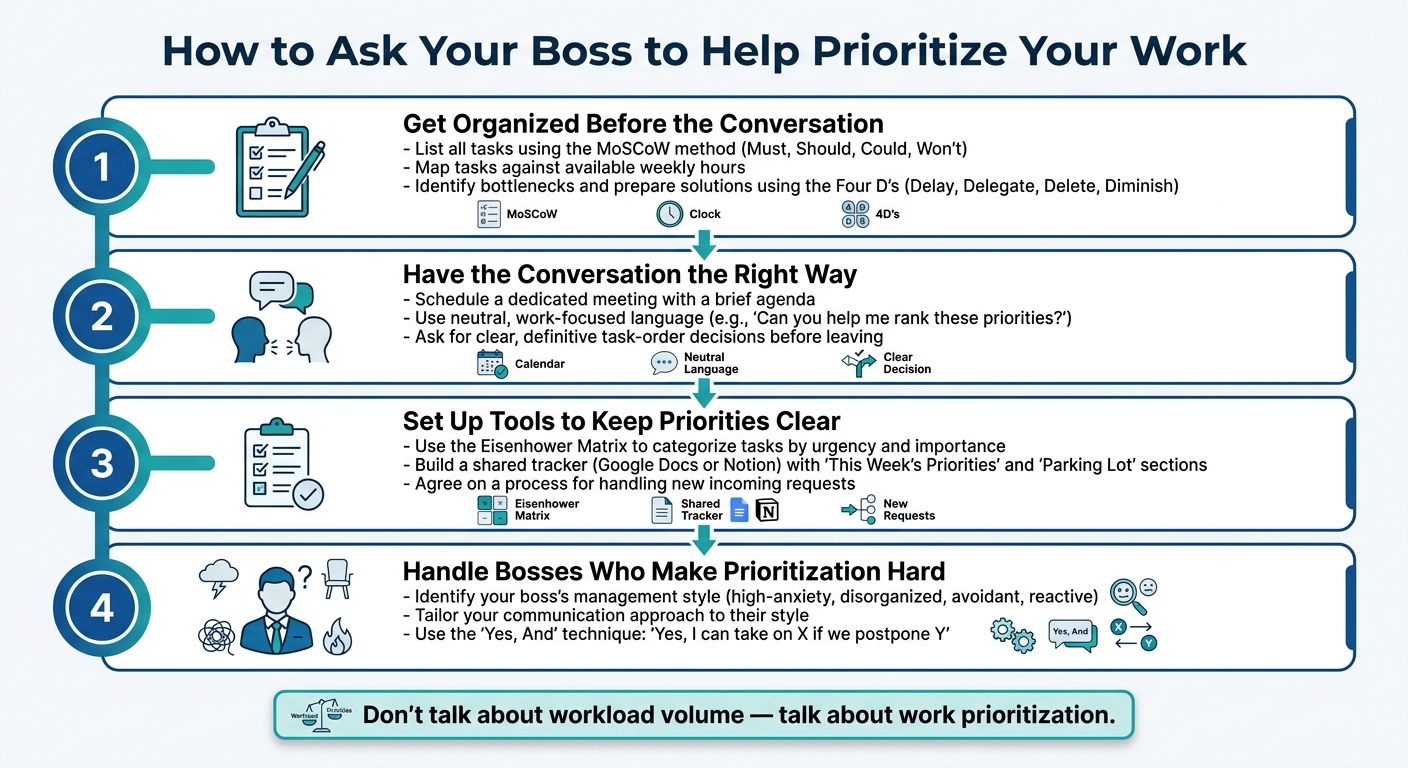
How to Ask Your Boss to Prioritize Your Work: 4-Step Process - Infographic © MyDifficultBoss.com
How to Get Your Boss to Prioritize
sbb-itb-1bb7cb4
Step 1: Get Organized Before the Conversation
Walking into your boss's office and saying, "I have too much work", without any preparation usually won’t lead to a productive outcome. Organizing your tasks ahead of time can turn a vague complaint into a focused discussion, making it easier for your boss to step in and help.
List Everything on Your Plate
Start by writing down every task and project you’re working on - even those you handle outside of regular hours. At this stage, don’t leave anything out.
When refining this list for your boss, leave out routine tasks like checking emails or responding to Slack messages. These can distract from the bigger picture. Instead, concentrate on work that requires decisions or prioritization. To make things easier, you can use a simple framework like the MoSCoW method - categorizing tasks into Must, Should, Could, and Won’t. Once your list is ready, compare it to the time you actually have available.
Check Your Capacity Against Your Workload
It’s important to distinguish between feeling overwhelmed and genuinely being overworked. One is emotional; the other is a clear mismatch between your workload and available hours. To show this clearly, break down your tasks and map them against your weekly working hours. Look for overlapping deadlines or areas where something has to give.
Pinpoint bottlenecks, like a report that takes five hours to complete or tasks involving tedious manual work. If you’re unsure whether your timelines are realistic, ask a trusted colleague to review your workload. A fresh perspective can reveal whether the workload is truly excessive or if time management might be part of the issue. This is especially common when dealing with a micromanager who tracks every minute. This step ensures you’re prepared to discuss realistic timelines with your boss.
Know What You Need From Your Boss
What do you want your boss to do - help prioritize deadlines, extend due dates, or reassign a lower-priority project? Being specific about what you need makes it easier to find solutions.
Use the "Four D’s" - delay, delegate, delete, or diminish - to guide your proposals. Instead of presenting just the problem, come prepared with solutions. Productivity expert Julie Morgenstern puts it best:
"Never go to your boss with a problem unless you have a solution."
For instance, Lisa Sterling, who served as VP of Product Strategy at Ceridian in 2015, documented her dual-role responsibilities, identified areas where she was struggling, and proposed delaying some projects and delegating others. Her CEO not only approved hiring additional help but also provided guidance on delegation. Having a clear plan made all the difference in her case.
One great resource to use to scope out your conversation is MyDifficultBoss.com which has lots of word for word scripts (and strategies) you can use in dealing with a boss who gives you too much word and needs to prioritize better.
Step 2: Have the Conversation the Right Way
With your task list organized and your needs clarified from Step 1, it's time to approach your boss in a focused, constructive way. Instead of venting about being overwhelmed, aim for a conversation that’s solution-oriented and productive.
Pick the Right Time and Format
Timing and preparation are everything. Rather than bringing this up on the fly, schedule a dedicated meeting. Sending a brief agenda beforehand helps set expectations and allows your boss to come prepared. If the matter isn't urgent, save it for your regular one-on-one meeting. As Jessica Kay, Writer and Digital Marketer at Cubicle Chic, advises:
"If you could wait, always leave the questions for your regular one-on-one meetings."
When the meeting begins, get straight to the point. Be ready to outline the issue in under two minutes, using your task list to show that you've done your homework.
Keep the Language Neutral and Work-Focused
The way you frame your concerns can make or break the conversation. Avoid emotionally charged phrases like "I'm drowning" or "I can't handle this." Instead, shift the focus to prioritization and impact. Simon Sinek, Founder of The Optimism Company, highlights this approach:
"Instead of talking about workload, talk about work prioritization."
This positions you as proactive and results-driven. For example, you could start with: "I need your help. Can you help me prioritize my current list so I’m focusing on what you see as most important?" This collaborative tone not only invites your boss’s input but also reinforces their role as a guide.
Here’s how to reframe your language:
| Instead of saying... | Try saying... |
|---|---|
| "I'm overwhelmed." | "I need to focus on high-impact tasks." |
| "I can't take on anything else." | "Where should this new task fit in with my current assignments?" |
| "I have too much work." | "Can you help me rank these three projects based on current deadlines?" |
By keeping the conversation neutral and centered on priorities, you pave the way for clear, actionable decisions.
Ask for Clear Priority Decisions
Wrap up the discussion by getting definitive answers about task order. Present a couple of options for sequencing your work and ask your boss to rank them. For example: "I can complete the client report by Thursday if I postpone the internal audit to next week. Does that work, or is the audit a higher priority?"
If their response feels unclear, follow up with specific questions like: "Is the client report more urgent than the internal audit?" The ultimate goal is to leave the meeting with a shared understanding of what comes first. This ensures accountability on both sides and helps you move forward with confidence.
Step 3: Set Up Tools to Keep Priorities Clear Over Time
Once you’ve clarified your priorities with your boss, the next challenge is keeping them clear as new tasks and shifting deadlines inevitably arise. A single conversation won’t cut it - you’ll need consistent tools and habits to stay aligned week after week.
Use a Simple Priority Framework
A great starting point is the Eisenhower Matrix, which organizes tasks into four categories based on urgency and importance. By mapping tasks using this framework, you and your boss can quickly decide where any new request fits. For instance, when a new task pops up, ask, “What actions or changes would make the biggest difference in 90 days?”. This question helps cut through distractions and zero in on what truly matters. Once priorities are clear, document them together for future reference.
Build a Shared Priority Tracker
After your discussion, create a shared tracker - this could be as simple as a Google Doc or a Notion page. Divide it into two sections:
- "This Week's Priorities": Focus on 2–3 high-impact tasks.
- "Parking Lot": Reserve this for tasks that aren’t urgent but need to stay on the radar for later discussion.
You might also include a "Roadblocks" section to highlight issues that require approvals or decisions. This gives your boss a chance to step in and help clear obstacles.
Before every check-in, update the tracker. As Amanda Goetz, 2x Founder and Executive Coach, wisely notes:
"If you don't own the narrative of your work, someone else will fill in the blanks for you."
This tracker becomes your go-to tool for keeping priorities visible and ensuring alignment on what’s most important.
Agree on a Process for New Requests
New tasks can easily derail focus if there’s no process in place. Avoid this by agreeing with your boss on how to handle incoming requests. Simon Sinek offers this advice:
"By having the boss take accountability for priorities, you take accountability for working through them in order."
In practical terms, this means responding to new tasks with, “Here’s my current priority list. Where does this new task fit?” Start with your top task and let your boss decide what gets shifted. This approach ensures shared accountability and keeps priorities balanced, even as new demands arise.
Step 4: Handle Bosses Who Make Prioritization Hard
Once you've set clear priorities, the next challenge is adapting to your boss's unique management style. Some bosses make prioritization tricky by constantly shifting focus, dodging decisions, or labeling every new task as urgent. Tweaking your approach to fit their style can make navigating these challenges much easier.
Adjust Your Approach Based on Your Boss's Style
Every boss handles prioritization differently, so understanding their style is crucial. For instance, a high-anxiety boss might benefit from a daily email summarizing your planned workload. This simple routine can set expectations upfront and reduce unnecessary interruptions. On the other hand, a disorganized boss may respond better to a shared visual calendar. By showing how your time is allocated, you can illustrate what tasks might need to be bumped when new demands arise.
It's also helpful to separate your work into two categories during these discussions: reflective work and reactive work. Reflective work includes tasks like writing or strategizing that require uninterrupted focus, while reactive work involves quick responses or handling immediate requests. Protecting time for reflective work is essential. As Nir Eyal points out, failing to plan for this kind of work can leave you "running fast in the wrong direction" due to constant reactive distractions.
If you're unsure how to approach your boss, the Boss Decoder Quiz can help. This quick, 3-minute tool identifies your boss's specific "type" - whether they're avoidant, reactive, or something else - and provides tailored communication scripts. Understanding their style can completely change how you approach prioritization discussions.
Use Scenario-Based Resources to Prepare
Tailoring your approach is just the first step. To handle tough prioritization conversations effectively, preparation is key. Walking into these discussions unprepared can backfire. Fortunately, MyDifficultBoss.com offers a library of over 135 scenarios, complete with guides for challenges like "Boss doesn't set priorities at all", "Boss gives conflicting instructions", and "Boss gives too much work." Each scenario includes step-by-step solutions, sample scripts, and strategies you can customize to fit your needs.
One particularly useful technique from this library is the "Yes, And" approach. Instead of outright rejecting a new task, frame your response collaboratively. For example, say, "Yes, I can take on X if we postpone Y." This shifts the responsibility for prioritization back to your boss while keeping the conversation constructive.
Conclusion: How to Keep Priorities Clear Going Forward
The steps outlined in this guide are designed to help you and your boss stay aligned on what truly matters, ensuring tasks are executed effectively. Prioritization isn’t something you set and forget - it’s a habit that requires regular attention. By organizing your tasks, focusing on the impact of your work, using shared tools, and tailoring your communication style, you can maintain clarity and avoid unnecessary confusion. As Simon Sinek points out, the key is shifting the focus from the sheer volume of tasks to prioritizing what’s most important. When your boss takes charge of setting priorities and you focus on execution, the result is a collaborative and productive partnership. This approach keeps roles defined and work flowing smoothly.
Make it a point to use shared tools to keep priorities updated as your workload changes. The frequency of updates depends on your work dynamic - daily updates might work better if your boss prefers close oversight, while a weekly summary can suffice if you have more independence. Regular updates prevent misalignment and help avoid a backlog of tasks. When new responsibilities come up, present your current to-do list and ask, “Where does this fit?”. This keeps priority-setting in your boss’s hands and prevents the kind of task pile-ups that lead to stress and confusion.
If you’re looking for more support, tools like MyDifficultBoss.com and its Boss Decoder Quiz can help you navigate these conversations with confidence. For those dealing with particularly challenging bosses, the platform also offers scenario-based guides and scripts to keep you ready for any situation.
FAQs
What should I bring to a prioritization meeting with my boss?
To make the most of your conversation, come prepared with a clear list of your current tasks, deadlines, and projects that require prioritization. Include a brief overview of your goals and any specific questions about how to align your priorities. Tools like the Boss Decoder Quiz on MyDifficultBoss.com can provide insights into your boss’s management style, helping you tailor the discussion for a more productive outcome. This approach ensures the focus stays on managing your workload effectively.
How do I ask for priorities without sounding overwhelmed?
To discuss priorities with your boss without appearing overwhelmed, aim for clear and professional communication. Frame your request as a desire to focus on what matters most. For example, you could say: “I want to ensure my efforts align with the team’s priorities. Could you help clarify which tasks are most urgent?”
If you need additional support, platforms like MyDifficultBoss.com provide helpful tools and scripts for navigating these conversations. They even offer a Boss Decoder Quiz to help you tailor your approach based on your boss’s management style.
What if my boss won’t commit to clear priorities?
If your boss struggles to set clear priorities, managing your workload can feel like navigating a maze. The website MyDifficultBoss.com recommends asking focused questions to better understand their expectations and direct your efforts more effectively. They even offer a Boss Decoder Quiz to help you identify your boss's management style and adjust your approach accordingly. By maintaining open, respectful communication and asking specific questions about your responsibilities, you can gradually create more clarity and alignment in your work.